오늘 부로 개인과제 작업을 제출까지 완료했다. 요 근래 공휴일이 연속으로 걸쳐서 덩달아 신나게 놀고 나서, 막상 다시 유니티를 잡으려니 의욕이 바닥을 쳤다. 강의도 산더미처럼 밀렸는데 사실 큰일이다.
이번 과제에서 건졌다고 할 만한 내용은 InputSystem의 InvokeUnityEvents, 미로 만들기 알고리즘이다.
InputSystem-InvokeUnityEvents
InputSystem의 Behavior 기본값은 SendMessages다. 이것을 InvokeUnityEvents로 변경하고, 지정된 InputAction의 입력 키를 누르면 그에 맞는 값을 InputAction.CallbackContext 클래스의 인자로 받아 바로 사용할 수 있다.
아래는 InputSystem의 상세와 이를 사용한 코드다. 이 코드로 플레이어의 이동, 방향 전환이 모두 이루어진다.
(Delegate를 이용한 옵저버 패턴이라던가, 그런건 없다. 따라서 코드의 재활용성은 보장하지 못한다.)

using System;
using System.Collections;
using System.Collections.Generic;
using UnityEngine;
using UnityEngine.InputSystem;

public class PlayerController : MonoBehaviour
{
    [Header("Movement")]
    public float moveSpeed;
    private Vector2 curMovementInput;
    [Range(1f, 10f)]
    public float accelRateInput;

    [Header("Look")]
    public Transform cameraContainer;
    public float minXLook;
    public float maxXLook;
    private float camCurXRot;
    private float camCurYRot;
    public float lookSensitivity;

    private Vector2 mouseDelta;

    [HideInInspector]
    public bool canLook = true;
    [HideInInspector]
    public bool canAccel = true;
    private bool isFlashOn = false;

    [SerializeField]
    private GameObject flashLight;
    private Rigidbody _rigidbody;

    public static PlayerController instance;

    private void Awake()
    {
        instance = this;
        _rigidbody = GetComponent<Rigidbody>();
    }

    void Start()
    {
        Cursor.lockState = CursorLockMode.Locked;
    }

    private void FixedUpdate()
    {
        Move();
    }

    private void LateUpdate()
    {
        if (canLook)
        {
            CameraLook();
        }
    }
    private void Move()
    {
        Vector3 direction = (transform.forward * curMovementInput.y * accelRateInput + transform.right * curMovementInput.x) * Time.fixedDeltaTime;
        direction *= moveSpeed;
        direction.y = _rigidbody.velocity.y;

        _rigidbody.velocity = direction;
    }

    private void CameraLook()
    {
        camCurXRot += mouseDelta.y * lookSensitivity;
        camCurXRot = Mathf.Clamp(camCurXRot, minXLook, maxXLook);
        cameraContainer.localEulerAngles = new Vector3(-camCurXRot, 0, 0); // 회전값은 시계회전이 +다.
        // 아래 위를 볼때마다 Player오브젝트가 통째로 움직이면 이상하니까 x축 cam회전은 camContainer에게 맡긴다.

        camCurYRot = mouseDelta.x * lookSensitivity;
        transform.eulerAngles += new Vector3(0, camCurYRot, 0);
    }

    public void OnMoveInput(InputAction.CallbackContext context) // 플레이어 이동 입력 : WASD
    {
        if (context.phase == InputActionPhase.Performed)
        {
            curMovementInput = context.ReadValue<Vector2>();
        }
        else if (context.phase == InputActionPhase.Canceled)
        {
            curMovementInput = Vector2.zero;
        }
    }

    public void OnLookInput(InputAction.CallbackContext context) // 캠 회전 입력 : Mouse Delta
    {
        mouseDelta = context.ReadValue<Vector2>();
    }

    public void OnAccelerateInput(InputAction.CallbackContext context) // 가속 입력 : LShift
    {
        if (!canAccel || context.phase == InputActionPhase.Canceled)
        {
            accelRateInput = 1f;
        }
        if (context.phase == InputActionPhase.Performed)
        {
            if (canAccel && curMovementInput.y >= 0f) // LShift누른 채로 플레이어 전진 상태일 때만
            {
                accelRateInput = 2.0f; // 가속 적용
            }
        }
    }

    public void OnFlashLightInput(InputAction.CallbackContext context)
    {
        if (context.phase == InputActionPhase.Started)
        {
            if (!isFlashOn)
            {
                flashLight.SetActive(true);
                isFlashOn = true;
            }
            else
            {
                flashLight.SetActive(false);
                isFlashOn = false;
            }
        }
    }
}
미로 생성 알고리즘
상당히 괜찮은 유튜브 영상을 보고 따라 제작했다. 재귀적인 알고리즘이다.
아래는 그 링크와 사용한 오브젝트, 스크립트다.
(실행 시 어마어마한 양의 오브젝트가 생성돼서 과연 성능 면에서 유용한 기능인지는 미지수다.)
https://www.youtube.com/watch?v=_aeYq5BmDMg

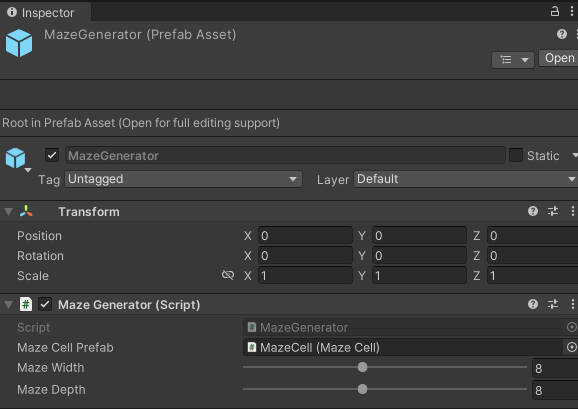
MazeCell의 스크립트
using System.Collections;
using System.Collections.Generic;
using UnityEngine;

public class MazeCell : MonoBehaviour
{
    [SerializeField]
    private GameObject _leftWall;
    [SerializeField]
    private GameObject _rightWall;
    [SerializeField]
    private GameObject _frontWall;
    [SerializeField]
    private GameObject _backWall;
    [SerializeField]
    private GameObject _unvisitedBlock;

    public bool IsVisited { get; private set; }

    public void Visit() // 현재 위치의 셀 처리
    {
        IsVisited = true; // 해당 위치에 온 적이 있다.
        _unvisitedBlock.SetActive(false); // unvisitedBlock 비활성화 => 공간 만들기
    }

    public void ClearLeftWall()
    {
        _leftWall.SetActive(false);
    }
    public void ClearRightWall()
    {
        _rightWall.SetActive(false);
    }
    public void ClearFrontWall()
    {
        _frontWall.SetActive(false);
    }
    public void ClearBackWall()
    {
        _backWall.SetActive(false);
    }

}
MazeGenerator의 스크립트
using System.Collections;
using System.Collections.Generic;
using System.Linq;
using UnityEngine;

public class MazeGenerator : MonoBehaviour
{
    [SerializeField]
    private MazeCell _mazeCellPrefab;

    [Range(3, 15)]
    public int _mazeWidth;

    [Range(3, 15)]
    public int _mazeDepth;

    private MazeCell[,] _mazeGrid;

    public static MazeGenerator instance;

    private void Awake()
    {
        instance = this;
    }

    IEnumerator Start() // _mazeWidth, _mazeDepth의 크기만큼 미로 판 깔기
    {
        _mazeGrid = new MazeCell[_mazeWidth, _mazeDepth];

        for (int x = 0; x < _mazeWidth; x++)
        {
            for (int z = 0; z < _mazeDepth; z++)
            {
                _mazeGrid[x,z] = Instantiate(_mazeCellPrefab, new Vector3(x, 0, z), Quaternion.identity);
            }
        }

        yield return GenerateMaze(null, _mazeGrid[0, 0]); // 이전셀 = null, 현재셀 = [0,0]으로 놓고 GenerateMaze시작
    }

    private IEnumerator GenerateMaze(MazeCell previousCell, MazeCell currentCell)
    {
        currentCell.Visit(); // 현재 위치의 셀 처리 호출
        ClearWalls(previousCell, currentCell); //

        yield return new WaitForSeconds(0.005f); // 0.005초 기다렸다가 진행

        MazeCell nextCell; // currentCell -> nextCell로 갈 변수 선언

        do // 처음 한번은 무조건 해야하니까 do로 반복
        {
            nextCell = GetNextUnvisitedCell(currentCell); // 다음에 갈 셀 반환
            if (nextCell != null)
            {
                yield return GenerateMaze(currentCell, nextCell); // 재귀 호출, currentCell -> previousCell, nextCell -> currentCell
            }
        } while (nextCell != null);
    }

    private MazeCell GetNextUnvisitedCell(MazeCell currentCell)
    {
        var unvisitedCells = GetUnvisitedCells(currentCell); // 진행 대상 좌표를 모아 놓은 제네릭

        return unvisitedCells.OrderBy(x => Random.Range(1, 10)).FirstOrDefault(); // 제네릭 중 무작위로 하나 골라 nextCell로 반환
    }

    private IEnumerable<MazeCell> GetUnvisitedCells(MazeCell currentCell)
    {
        int x = (int)currentCell.transform.position.x; // 현재 셀의 위치
        int z = (int)currentCell.transform.position.z;

        if (x + 1 < _mazeWidth) // 현재 셀의 x좌표가 미로의 오른쪽 끝 x좌표 미만이면
        {
            var cellToRight = _mazeGrid[x + 1, z]; // 현재 셀의 오른쪽 좌표는 셀이 갈 수 있는 좌표가 있는 공간이다.

            if (cellToRight.IsVisited == false) // 그 오른쪽 좌표가 미로를 만드는 과정에서 아직 현재 셀이 지나친 적 없는 좌표라면
            {
                yield return cellToRight; // 그 좌표는 셀 진행 대상이 된다.
            }
        }
        if (x - 1 >= 0)
        {
            var cellToLeft = _mazeGrid[x - 1, z];

            if (cellToLeft.IsVisited == false)
            {
                yield return cellToLeft;
            }
        }
        if (z + 1 < _mazeDepth)
        {
            var cellToFront = _mazeGrid[x, z + 1];

            if (cellToFront.IsVisited == false)
            {
                yield return cellToFront;
            }
        }
        if (z - 1 >= 0)
        {
            var cellToBack = _mazeGrid[x, z - 1];

            if (cellToBack.IsVisited == false)
            {
                yield return cellToBack;
            }
        }
    }

    private void ClearWalls(MazeCell previousCell, MazeCell currentCell)
    {
        if (previousCell == null) // 이전 셀이 null이면(최초 미로 제작 시점)
        {
            return; // 그냥 넘어간다.
        }

        if (previousCell.transform.position.x < currentCell.transform.position.x)
        { // previousCell || currentCell 인 상황(X축 상황을 가정하고 양 셀 사이에 두개의 벽 || 존재)일 때
            previousCell.ClearRightWall(); // previousCell의 오른쪽 벽 제거
            currentCell.ClearLeftWall(); // currentCell의 왼쪽 벽 제거
            return; // => previousCell currentCell, 양 셀의 공간이 이어졌다. 끝
        }
        if (previousCell.transform.position.x > currentCell.transform.position.x)
        {
            previousCell.ClearLeftWall();
            currentCell.ClearRightWall();
            return;
        }
        if (previousCell.transform.position.z < currentCell.transform.position.z)
        {
            previousCell.ClearFrontWall();
            currentCell.ClearBackWall();
            return;
        }
        if (previousCell.transform.position.z > currentCell.transform.position.z)
        {
            previousCell.ClearBackWall();
            currentCell.ClearFrontWall();
            return;
        }
    }
}'UNITY' 카테고리의 다른 글
| UNITY_20231017[팀 과제, ProBuilders] (1) | 2023.10.17 |
|---|---|
| UNITY_20231013[팀 과제, Ray in UNITY3D] (0) | 2023.10.17 |
| UNITY_20231006[유니티 3D 강의, 알고리즘 문제 풀이] (0) | 2023.10.06 |
| UNITY_20231005[유니티 3D 강의 시작, 알고리즘 문제 풀이] (0) | 2023.10.05 |
| UNITY_20231004[팀 과제-로그라이크 RPG - 완료] (0) | 2023.10.04 |
